App Cloner on Firestick just got REMOVED by Amazon! More Blocks…

The landscape for Amazon Fire TV users has fundamentally shifted. Amazon is intensifying its crackdown on unofficial apps, moving beyond simple content blocks to target the very tools users rely on for customization and workaround.
The fact App Cloner just got removed from the Firestick, is the clearest signal yet that Amazon is committed to transforming the Firestick from an open Android-based device into a tightly locked ecosystem.
This move follows a series of updates designed to eliminate access to unlicensed content, forcing users to reassess their streaming habits and device security.

The Latest Victim: Why Amazon Targeted App Cloner
App Cloner was a critical tool for advanced Firestick users who sought to bypass Amazon’s growing list of disabled applications. Its core function was ingenious:
- Circumvention by Renaming: Android and Firestick apps are identified by a unique package name (e.g.,
com.example.app). When Amazon blacklists an app, it blocks that specific package name. - App Cloner’s Function: App Cloner allowed users to copy an existing application and change its package name to something innocuous, such as a weather app or a clock app. This simple act of renaming allowed the app to slip past Amazon’s detection system and continue functioning.
However, as I reported in my latest video, Amazon has successfully counter-blocked the workaround tool itself, demonstrating an increasing level of control over the Fire OS environment. As I mentioned in my latest video on YouTube, “Amazon are now blocking that app too… Amazon are literally shielding down on everything. There is no more customization, no owners rights to the Fire Stick” ([01:00]).
This action confirms that Amazon is actively targeting not just the content but the methods used by the community to retain control over their purchased devices.
Amazon’s Long Game: The Shift to Vega OS
The crackdown on sideloading tools is part of a broader, long-term strategy being rolled out by Amazon: the transition away from the Android-based Fire OS to its new, custom-built operating system, Vega OS.
Devices like the new Fire TV 4K Select now run on Vega OS. This change is monumental because:
- Elimination of Android Compatibility: Vega OS is a Linux-based operating system, meaning it cannot run traditional Android APKs. This instantly eliminates the possibility of sideloading non-official apps.
- Increased Corporate Control: The shift has been welcomed by anti-piracy organizations like the Federation Against Copyright Theft (FACT), which views the move as “a welcome step in tackling the growing threat of illegal streaming apps.”
- Permanent Lockout: While older Firesticks still rely on the Android base, the consensus in the streaming community is that the continuous app-blocking, coupled with the new Vega OS, represents the inevitable future of the Fire TV platform.
The Threat to User Rights and Privacy
The recent blocks extend far beyond just streaming apps. The disabling of apps like Launcher Manager—which allowed users to customize the device’s home screen interface—illustrates Amazon’s intent to limit all non-standard usage.
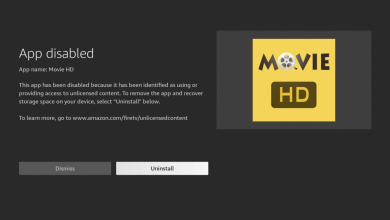
Users are now frequently confronted with explicit on-screen warning messages, which state: “One or more apps on your device have been identified as using or providing access to unlicensed content, including this app, and will be disabled” ([04:32]).
This systematic reduction in user freedom has led many to consider alternatives. As I explain in the video, the main driver for switching devices is not the presence of workarounds, but the principle of control: “The reason why people want to ditch the Amazon Fire Stick is simply because of the control they are adding to the Fire TV Stick… once we purchase the Fire Stick we should be able to do what we want, modify it how we want” ([02:04], [02:23]).
Protect Your Firestick: The Critical Need for a VPN
Amidst Amazon’s tightening grip and the visible warning messages, user privacy has never been more critical. When using third-party applications, your Internet Service Provider (ISP) and other entities can monitor your connection, potentially exposing your identity and streaming activity.

A Virtual Private Network (VPN) is the single most effective security measure streamers can take right now to protect themselves from scrutiny. A quality VPN:
- Encrypts Data: A VPN scrambles your internet traffic, preventing your ISP or any snooping entity from seeing what apps you are using or what content you are accessing.
- Masks Identity: By routing your connection through a remote server, a VPN hides your real IP address, which is often shown to be vulnerable on-screen (a vulnerability discussed at the beginning of LeeTV’s recent video).
- Unlocks Content: VPNs allow you to connect to servers in different countries, which is essential for accessing geo-restricted official apps and streaming libraries.
Video & Guide for Safety
To fully understand the scope of the app blocking crisis and learn the essential steps for keeping your streaming activity private, watch the full analysis:
If you need a step-by-step guide to secure your streaming connection, we highly recommend setting up a VPN on your device immediately:
VPN Guide: How to Setup a VPN on Firestick
As always, I want to know what you think of the recent news. Comment below, and give the post a share on your socials 🙂